Morse Code Tree: The Fastest Way to Read Dots and Dashes


Most people learn morse code from a flat table, the kind with two columns: one for letters, one for their morse equivalent. It works, but memorizing 26 unrelated sequences is slow going. A morse code tree is different. It turns all those dots and dashes into a single branching structure your brain can actually follow.
One symbol at a time. Left or right. You end up at a letter.
That's the whole idea.
What Is a Morse Code Tree?
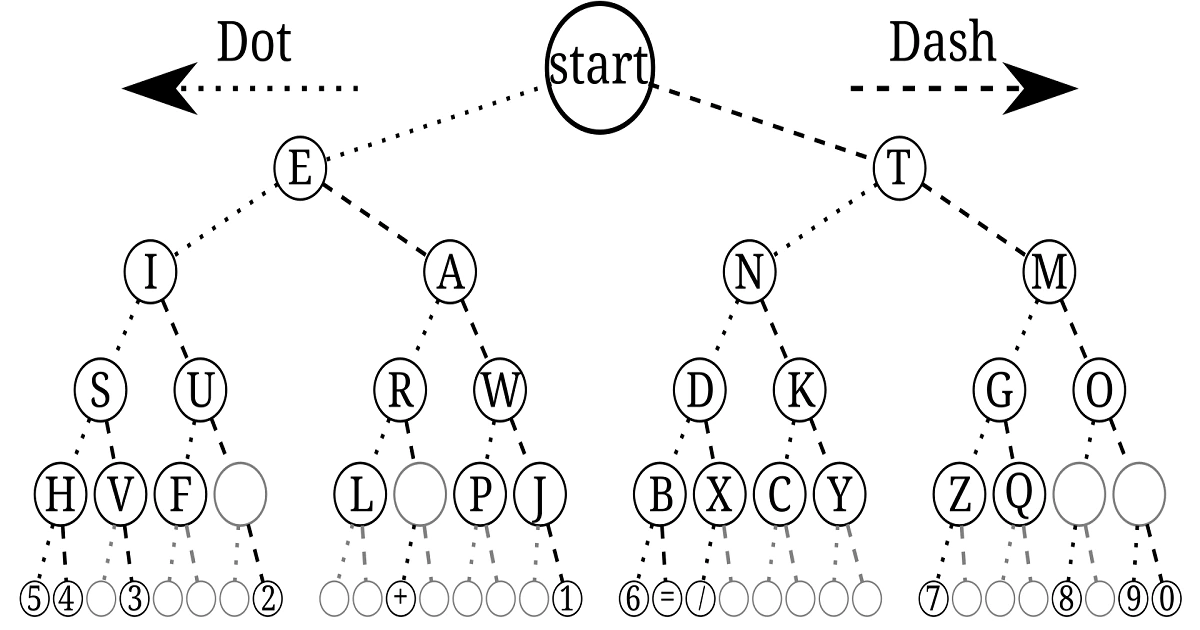
A morse code tree is a binary tree where each node holds a letter, and you reach that letter by following a path of dots and dashes from the root. Every dot sends you left. Every dash sends you right. Start at the top, follow the symbols in your sequence, and whatever node you land on is your letter.
The root sits alone at the top, no letter, just a starting point. One level down, E (a single dot) sits to the left, and T (a single dash) sits to the right. Those are the two simplest letters in morse, and the tree reflects that: they're the closest to the root.
Go deeper and the sequences get longer. S (three dots) is left-left-left. O (three dashes) is right-right-right. The tree doesn't hide this; it shows it. The structure is the pattern.
This is a different structure from a lookup table, where S and O are just two rows in a list with no obvious relationship to each other. In the tree, you can see that S and O are mirror images: same depth, opposite sides.
How a Morse Code Tree Works
Think of each branch as a decision. You're decoding a signal, symbol by symbol. Dot? Go left. Dash? Go right. When the signal stops, read the letter at your current node.
Take the letter R, which is · − · in morse. Starting at the root:
- Dot → move left (now at E's branch)
- Dash → move right (now at A's branch)
- Dot → move left (now at R)
Done. Three moves, one letter.
This is why programmers like the tree structure for decoding algorithms: the path through the tree is the decoding process. There's no lookup, no comparison. You just traverse.
The tree has four levels below the root for standard letters (A–Z), and a fifth level for numbers and some punctuation. Letters with short codes sit near the top. Letters with longer codes (the rarely used ones) sit deeper.
How to Read a Morse Code Tree (With a Visual)
The left child of every node is reached by adding a dot. The right child by adding a dash.
To decode any letter:
- Start at root
- For each symbol in the sequence, go left (·) or right (−)
- Read the letter at the node you land on
To find what sequence produces a letter:
- Find the letter in the tree
- Trace the path back to root
- Read left branches as dots, right branches as dashes
That second use (finding the code for a letter) is actually harder with a table than with a tree. With a tree, the path tells you the answer.
Decoding SOS With the Tree
SOS is · · · − − − · · ·, three letters, not one long sequence. Each letter gets decoded separately.
S (· · ·): Left, left, left → S. Three levels down, far left branch.
O (− − −): Right, right, right → O. Three levels down, far right branch.
S again: same as before.
Notice S and O are symmetrical in the tree. That's not a coincidence. It's the reason SOS was chosen as a distress signal: easy to send, impossible to misread, and visually obvious on paper or a tree diagram.
For more on SOS history and how to send it in different contexts, see The SOS distress signal history & how to send.
Morse Code Tree Chart: Full A–Z Reference
Below is the complete tree down to four levels (covering all 26 letters). Numbers require a fifth level.
Morse Code Tree Chart — Levels
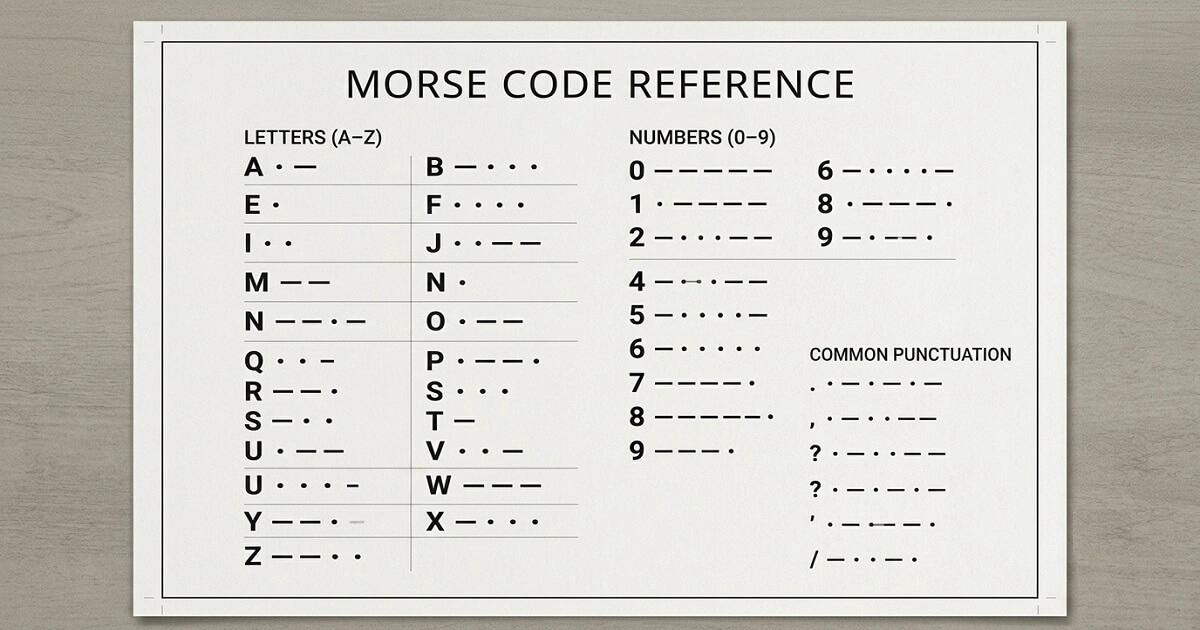
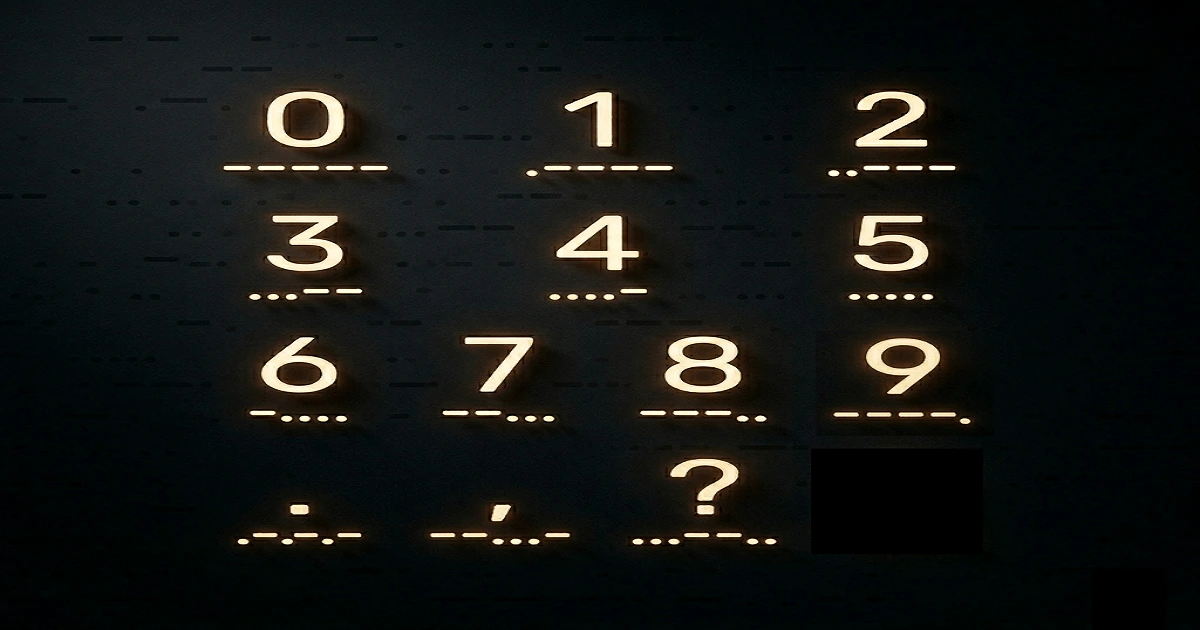
Numbers sit at level 5, always five symbols long. 1 is ·−−−−, 2 is ··−−−, and so on, moving left-to-right until 0 which is −−−−−.
If you just saw the A–Z tree breakdown and want a flat alphabet reference, check the Morse code alphabet chart.
Morse Code Tree vs. Lookup Table
The table wins for scanning. If you need to find the code for a letter you already know, a table is faster. Your eyes go straight to the row.
The tree wins for decoding. When you're receiving a signal and don't know what letter it is yet, the tree gives you a mechanical path to follow. No scanning, no searching. Just branch left or right until the signal ends.
For memorization, the tree is better. Patterns become visible. The short codes are near the top (E, T, I, A, N, M). Common letters sit at medium depth. Rare letters sit deep. Your memory attaches to structure rather than isolated sequences.
For computers, the tree is almost always the right choice. Lookup tables have O(n) search if unsorted. Binary trees give O(log n) traversal, and because morse code's tree is fixed and balanced at the letter-level, traversal is both fast and predictable.
That said, for a beginner sitting at a desk with a printed sheet, the table is genuinely fine. Don't let anyone tell you there's one right answer here. If you want a guided method for learning morse quickly, see Morse Code for Beginners: 5 Fast & Easy Learning Methods.
Morse Code as a Binary Tree (Data Structure)
Each node in a morse code tree holds three things: a character, a left child (dot branch), and a right child (dash branch). The root node holds no character. It's just the entry point.
Node structure:
type Node = {
  char: string | null;   // letter stored at this node

  left: Node | null;     // dot (·) path
  right: Node | null;    // dash (−) path
};
Traversal is straightforward preorder: visit the current node, then recurse left, then right. If you want to print all letters in sequence-length order, level-order traversal (BFS) is cleaner.
Time complexity for decoding one letter: O(L) where L is the length of the morse sequence, typically 1–5. That's effectively O(1) for practical purposes.
Space complexity for the tree: O(N) where N is the number of nodes. For standard morse (A–Z, 0–9, common punctuation), that's around 60–70 nodes. Tiny.
How to Make a Morse Code Tree in Java
    class MorseNode {
    char letter;
    MorseNode dot;   // left
    MorseNode dash;  // right

    MorseNode(char letter) {
        this.letter = letter;
    }
}

class MorseTree {
    MorseNode root = new MorseNode('');

    static String[][] MORSE_TABLE = {
        {"A", ".-"}, {"B", "-..."}, {"C", "-.-."}, {"D", "-.."},
        {"E", "."}, {"F", "..-."}, {"G", "--."}, {"H", "...."},
        {"I", ".."}, {"J", ".---"}, {"K", "-.-"}, {"L", ".-.."},
        {"M", "--"}, {"N", "-."}, {"O", "---"}, {"P", ".--."},
        {"Q", "--.-"}, {"R", ".-."}, {"S", "..."}, {"T", "-"},
        {"U", "..-"}, {"V", "...-"}, {"W", ".--"}, {"X", "-..-"},
        {"Y", "-.--"}, {"Z", "--.."},
        {"0", "-----"}, {"1", ".----"}, {"2", "..---"},
        {"3", "...--"}, {"4", "....-"}, {"5", "....."},
        {"6", "-...."}, {"7", "--..."}, {"8", "---.."},
        {"9", "----."}
    };

    void insert(String code, char letter) {
        MorseNode current = root;
        for (char symbol : code.toCharArray()) {
            if (symbol == '.') {
                if (current.dot == null) current.dot = new MorseNode('');
                current = current.dot;
            } else {
                if (current.dash == null) current.dash = new MorseNode('');
                current = current.dash;
            }
        }
        current.letter = letter;
    }

    void buildTree() {
        for (String[] entry : MORSE_TABLE) {
            insert(entry[1], entry[0].charAt(0));
        }
    }

    char decode(String code) {
        MorseNode current = root;
        for (char symbol : code.toCharArray()) {
            if (current == null) return '?';
            current = (symbol == '.') ? current.dot : current.dash;
        }
        return (current != null && current.letter != '') ? current.letter : '?';
    }

    String decodeMessage(String message) {
        StringBuilder result = new StringBuilder();
        for (String word : message.split("   ")) {      // 3 spaces = word gap
            for (String code : word.split(" ")) {
                result.append(decode(code));
            }
            result.append(' ');
        }
        return result.toString().trim();
    }

    public static void main(String[] args) {
        MorseTree tree = new MorseTree();
        tree.buildTree();

        // Decode SOS
        System.out.println(tree.decodeMessage("... --- ...")); // SOS
    }
}
A few notes on this code:
The insert method walks the tree one symbol at a time, creating nodes as needed. The decode method does the same without creating anything, just traversal. The decodeMessage method handles word gaps (three spaces between words in standard morse) and letter gaps (single space).
The '?' return for unrecognized sequences is a deliberate choice. You could throw an exception, but if you're decoding real-world morse signals with noise, returning a placeholder is friendlier.
Morse Code Tree in Python
    class MorseNode:
    def __init__(self):
        self.letter = None
        self.dot = None    # left branch
        self.dash = None   # right branch

class MorseTree:
    MORSE_TABLE = {
        'A': '.-', 'B': '-...', 'C': '-.-.', 'D': '-..', 'E': '.',
        'F': '..-.', 'G': '--.', 'H': '....', 'I': '..', 'J': '.---',
        'K': '-.-', 'L': '.-..', 'M': '--', 'N': '-.', 'O': '---',
        'P': '.--.', 'Q': '--.-', 'R': '.-.', 'S': '...', 'T': '-',
        'U': '..-', 'V': '...-', 'W': '.--', 'X': '-..-', 'Y': '-.--',
        'Z': '--..',
        '0': '-----', '1': '.----', '2': '..---', '3': '...--',
        '4': '....-', '5': '.....', '6': '-....', '7': '--...',
        '8': '---..', '9': '----.'
    }

    def __init__(self):
        self.root = MorseNode()
        self._build()

    def _build(self):
        for letter, code in self.MORSE_TABLE.items():
            node = self.root
            for symbol in code:
                if symbol == '.':
                    if not node.dot:
                        node.dot = MorseNode()
                    node = node.dot
                else:
                    if not node.dash:
                        node.dash = MorseNode()
                    node = node.dash
            node.letter = letter

    def decode(self, code):
        node = self.root
        for symbol in code:
            if symbol == '.':
                node = node.dot
            else:
                node = node.dash
            if node is None:
                return '?'
        return node.letter or '?'

    def decode_message(self, message):
        words = message.split('   ')
        return ' '.join(
            ''.join(self.decode(code) for code in word.split())
            for word in words
        )

# Usage
tree = MorseTree()
print(tree.decode_message('... --- ...'))  # SOS
print(tree.decode('.-'))                   # A
Python's None-chaining behavior makes the traversal slightly cleaner. The logic is identical to the Java version.
Frequently Asked Questions
What letter is at the top of the morse code tree?
The root node holds no letter. One level down, E (·) sits to the left and T (−) to the right. So if "top of the tree" means closest to the root with an actual letter, that's E and T.
How many levels does a morse code tree have?
Four levels for all 26 letters. Numbers and some punctuation need a fifth level, as they all use 5-symbol sequences.
Is a morse code tree the same as a binary tree?
Yes. Each node has at most two children: a left child (dot) and a right child (dash). That's exactly a binary tree. It's also a trie, specifically a binary trie, because the paths to nodes encode the keys.
Is there an interactive morse code tree online?
Our website has a full morse code translator. Type text, get morse, or paste morse to decode it. For a visual tree specifically, search for "morse code tree diagram" and you'll find several SVG versions worth bookmarking.
Is a morse code tree better than a table for beginners?
Depends what you mean by "better." For understanding the pattern of morse code (why short codes go to common letters, why E and T are single symbols) the tree wins. For quick reference while you're still learning, the table is probably faster to scan. Most experienced operators end up not needing either.