
MorseTranslator.net vs MorseCode.world
Discover what makes MorseTranslator.net the stronger choice for translating and learning Morse code.


Type SOS into either site and you'll get the same result: "...---..."
Both tools translate Morse code accurately and both include audio playback, making either one perfectly capable for basic conversion tasks.
The differences appear once you start using the tools beyond a quick translation.
Layout, playback controls, visual feedback, customization options, and overall usability all affect how easy a translator is to use.
Some features only matter after a few minutes of real use, especially when working with longer messages or trying to follow Morse code audio. That's where the comparison becomes more interesting, because the two tools take noticeably different approaches.
Feature Comparison: MorseTranslator.net vs MorseCode.world
Here's the full breakdown, pulled straight from both interfaces.
| Control | morsetranslator.net | morsecode.world |
|---|---|---|
| Live playback highlighting | ||
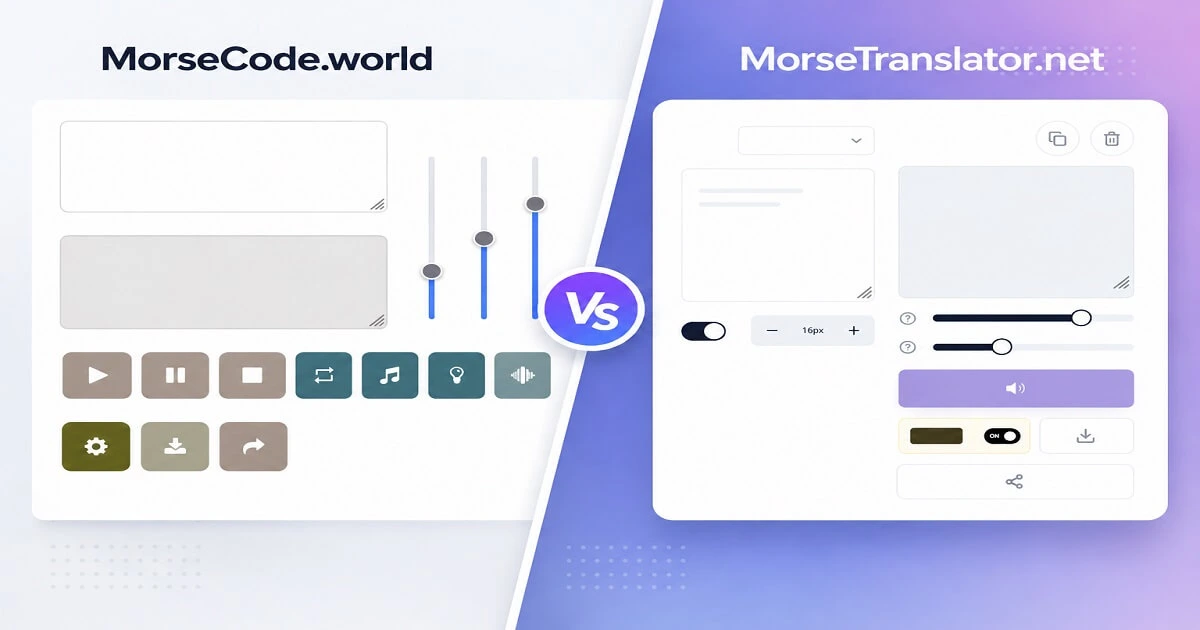
| Input/output layout | Side by side | Stacked |
| Text ↔ Morse mode selector | ||
| Include-spaces toggle | ||
| Adjustable output font size | ||
| Speed control | WPM slider | Speed slider |
| Tone control | Frequency in Hz | Pitch (no unit shown) |
| Volume slider | ||
| Separate Play / Pause / Stop | ||
| Repeat playback | ||
| Light / torch flash | ||
| Vibrate mode | ||
| Save or download audio | Download | Save Audio |
| Share output | Share | Send to a Friend |
| Untranslatable-character flag |
Neither tool is better than the other. They both translate Morse code accurately and provide audio playback. The differences come from how each tool handles translation, playback, and usability rather than the translation engine itself.
MorseCode.world's playback toolkit is more complete: three sliders instead of two, a working Repeat button, and the untranslatable-character flag MorseTranslator.net doesn't have. But MorseTranslator.net fights back with font and Morse code size control, live playback highlighting, and an include spaces option for better output control. It only uses two sliders because volume is better handled by your device's own buttons.
5 Differences Between MorseTranslator.net And MorseCode.world
This is where the two tools begin to separate. While both translate Morse code accurately, their design choices create very different user experiences.
Live playback highlighting
When Morse code audio plays, the active symbol is highlighted in real time. Beginners can instantly see which dot or dash matches the sound they are hearing. On longer messages this makes following the transmission dramatically easier because users never lose their place in the sequence.
Most Morse code translators play audio without showing which symbol is currently being transmitted.
Side-by-side translation layout
Input and output appear next to each other rather than stacked vertically. This reduces eye movement and makes editing faster because users can immediately see how each change affects the translated output.
morsecode.world uses a stacked layout with the input above the output.
Translation-focused controls
MorseTranslator includes tools such as a Text ↔ Morse switch, Include Spaces toggle, adjustable font size, frequency control in Hz, download options, and sharing features designed around everyday translation workflows.
morsecode.world offers several playback controls but lacks some of the translation-focused options found in MorseTranslator.
Cleaner workspace
The interface keeps distractions to a minimum and places the translator front and center. This becomes increasingly important when working with longer Morse code sequences or following audio playback.
morsecode.world contains more surrounding interface elements and ad placements.
Built-in learning path
Beyond translation, MorseTranslator includes a structured learning system for users who decide they want to learn Morse code rather than simply convert text occasionally.
morsecode.world focuses primarily on translation and utility tools.
Which Morse Code Translator Performs Better?
Looking strictly at the translators themselves, both tools are capable and accurate.
The differences come from how each tool handles translation, playback, and usability rather than the translation engine itself.
MorseTranslator.net focuses on speed, clarity, and a modern translation experience. Its side-by-side layout lets users see the original text and translated output simultaneously without constantly scrolling between sections.
Beyond basic translation, it includes thoughtful features that make everyday use faster and more intuitive. Live playback highlighting follows each character in real time, frequency can be adjusted using precise Hz controls, output size can be customized instantly, translation modes switch with a single click, and the Include Spaces option gives users greater control over formatting. Together, these features create a polished workflow that feels responsive, visual, and built for both beginners and experienced users.
MorseCode.world takes a different approach. It offers a broader collection of playback controls, including a dedicated Volume slider, Repeat playback, vibration support, and character flagging when unsupported symbols appear in the input. Those additions can be useful for users who frequently experiment with playback settings or want extra feedback when translating unusual characters.
Overall, MorseTranslator.net delivers the stronger experience. While MorseCode.world includes a few additional playback options, MorseTranslator.net combines a cleaner interface with modern usability features that make translating, reading, and learning Morse code faster and more enjoyable. Rather than adding controls for the sake of complexity, it focuses on making the entire translation process smoother from start to finish.
Which Morse Code Tool Should You Choose?
If you want something that’s quick, easy, and fun to use, MorseTranslator.net is the best pick. It changes words into Morse code the right way, and it looks really nice and neat on the screen. You can see your words and the Morse code side by side, hear it played back with lights that show you which part is playing, change how it sounds, and more. It doesn’t have a bunch of extra buttons that get in the way, it just helps you turn words into Morse code fast, read it clearly, and feel sure about what you’re doing.
Frequently Asked Questions
Which Morse code translator is better?
Both tools give you the right Morse code, but MorseTranslator.net is better because it adds helpful things that make using it more fun, not just a bunch of extra buttons that don't really help. It cares about what makes translating easier and more enjoyable for you.
What makes MorseTranslator.net different?
MorseTranslator.net includes several features not commonly found in Morse code translators, including live playback highlighting, side-by-side translation, frequency control displayed in Hz, and a built-in learning path for users who want to go beyond simple translation.
Can you learn Morse code with these tools?
Both tools can help users become familiar with Morse code, but MorseTranslator.net also includes a structured learning path designed to help users progress beyond occasional translation and develop recognition skills over time.